Line to Goal : Draw The Path
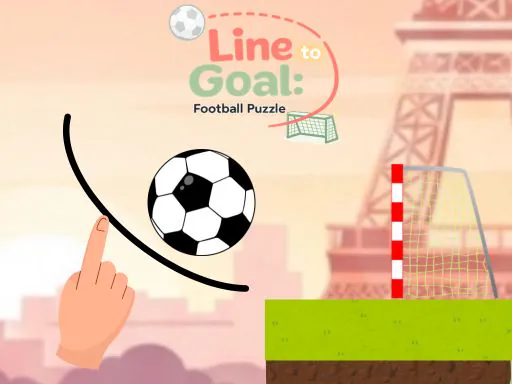
About Line to Goal : Draw The Path
Line to Goal skips kicking entirely and hands you a pencil instead: hold the left mouse button and drag to draw a path, and the ball follows whatever line you've drawn toward the goal. The physics reacts to the shape you draw rather than to power or angle sliders, so a line with a sharp bend slows the ball at that point, and a looping curve around an obstacle behaves completely differently from a straight line that happens to clip it. Getting it wrong doesn't cost a life in the usual sense — the reset button redraws the level from scratch, so failure just means erasing your last theory about the path and trying a different shape. That low cost per attempt is really the design: the puzzle isn't about mechanical execution, it's about reading the obstacle layout correctly before you draw anything at all.
How to Play
- Hold the left mouse button down and drag to draw a path from the ball toward the goal.
- Release to send the ball rolling along the exact line you drew.
- Curve your line around obstacles rather than drawing straight through them.
- Use the reset button to redraw the level from scratch if the path fails.
- Study the obstacle layout before committing to a line — a bad shape wastes the whole attempt.
Line to Goal : Draw The Path FAQ
Does the shape of the line actually change how the ball moves, or is it just a visual guide?
The shape genuinely matters — a sharp bend in your drawn line slows the ball down at that point the way a real curve would, so a jagged path behaves differently from a smooth one even if both technically end at the goal. Smoother curves generally carry more speed through to the end than lines with abrupt angle changes.
What is the actual point of the reset button instead of drawing a new line over the old one?
Reset clears the level back to its starting state rather than letting you layer a second line over a failed attempt, which matters because the ball only follows one path per try. You can't patch a line mid-roll, so once a drawn path is committed and wrong, resetting is the only way to start over cleanly.
How do you play Line to Goal : Draw The Path?
Hold the left mouse button down and drag to draw a path from the ball toward the goal. Release to send the ball rolling along the exact line you drew. Curve your line around obstacles rather than drawing straight through them. Use the reset button to redraw the level from scratch if the path fails. Study the obstacle layout before committing to a line — a bad shape wastes the whole attempt.
Is Line to Goal : Draw The Path free to play?
Yes. Line to Goal : Draw The Path is free to play in your browser on BreakArcade. There is no purchase, no subscription and no account required - open the page and press Play.
Do I need to download Line to Goal : Draw The Path?
No. Line to Goal : Draw The Path is an HTML5 game that runs inside your browser tab. Nothing is installed on your device, and closing the tab ends the session.
Can I play Line to Goal : Draw The Path on a school Chromebook?
Line to Goal : Draw The Path runs on any device with a modern browser, including low-powered school Chromebooks, because it loads in the browser rather than installing. Whether it opens depends on your network - some schools block the game host, which is outside our control.
More Sports Games





Last updated: 2026-09-19