Chess 3D
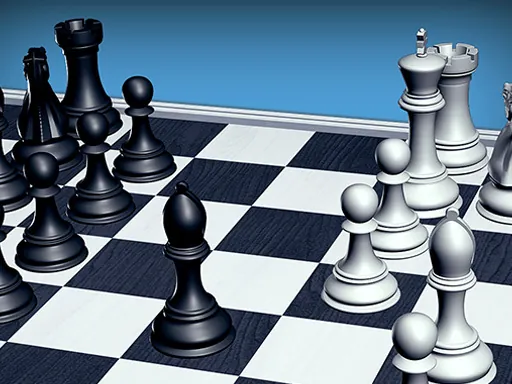
About Chess 3D
Standard chess rules apply here, but the 3D board changes how much you can trust a glance — judging whether a knight two rows back can actually reach a square is harder when perspective is compressing the board's far ranks, and a piece that looks blocked from one camera angle is often clearly not blocked from another. Clicking a piece highlights its legal moves, then clicking a highlighted square commits the move, so there's no drag-and-drop misfire to worry about. The camera can usually be rotated to check a threat from the opponent's side of the board, which matters more here than in a flat chess app since foreshortening hides diagonal bishop and queen lines especially well.
How to Play
- Click a piece to see its legal moves highlighted on the board.
- Click one of the highlighted squares to move there — there's no dragging involved.
- Rotate or reset the camera angle when you need to check whether a diagonal line is actually open, since the 3D perspective can hide it.
- Play through standard chess rules: checkmate the opponent's king to win, and watch for check warnings before you commit a move.
Chess 3D FAQ
Why does a diagonal that looks blocked turn out to be open?
The 3D camera angle compresses depth, so a bishop or queen's diagonal path can look interrupted by a piece that's actually one rank further back or forward than it appears. Rotating the camera before committing a move clears up most of these misreads.
Does clicking a piece move it immediately?
No — the first click only selects the piece and highlights where it's legal to go. Nothing moves until you click one of those highlighted squares, so selecting the wrong piece by accident costs nothing as long as you stop there.
How do you play Chess 3D?
Click a piece to see its legal moves highlighted on the board. Click one of the highlighted squares to move there — there's no dragging involved. Rotate or reset the camera angle when you need to check whether a diagonal line is actually open, since the 3D perspective can hide it. Play through standard chess rules: checkmate the opponent's king to win, and watch for check warnings before you commit a move.
Is Chess 3D free to play?
Yes. Chess 3D is free to play in your browser on BreakArcade. There is no purchase, no subscription and no account required - open the page and press Play.
Do I need to download Chess 3D?
No. Chess 3D is an HTML5 game that runs inside your browser tab. Nothing is installed on your device, and closing the tab ends the session.
Can I play Chess 3D on a school Chromebook?
Chess 3D runs on any device with a modern browser, including low-powered school Chromebooks, because it loads in the browser rather than installing. Whether it opens depends on your network - some schools block the game host, which is outside our control.
More Strategy Games
Last updated: 2026-09-19