Slime Color
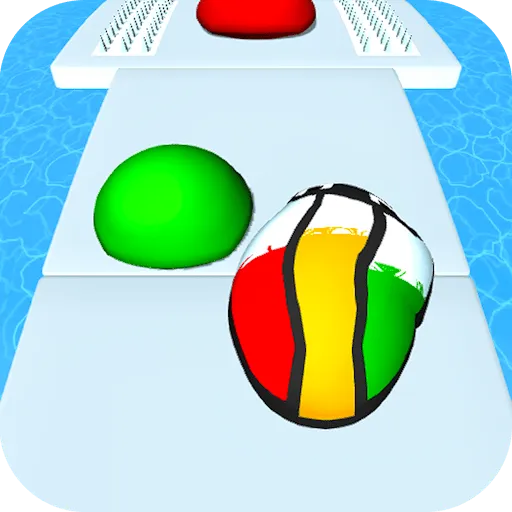
About Slime Color
The lane starts grey and the ball is what colours it — rolling over a paint spot loads that colour, and everything the ball touches afterwards keeps it. So a run has two jobs stacked on top of each other: staying on a narrow track with water down both sides, and picking up colours in an order that leaves the track looking like something rather than a smear. Obstacles are placed exactly where the paint is. Going over the edge ends the run outright, which keeps the levels short and the restarts quick.
How to Play
- Steer left and right to keep the ball on the track.
- Roll over a paint spot to pick up its colour.
- Plan the order you collect colours in — the trail keeps whatever came last.
- Treat the edges as fatal; the water is not a hazard you recover from.
Slime Color FAQ
Does the colour I pick up matter?
It decides what the track behind you looks like, since the ball paints as it rolls. Grabbing the spots in a careless order still finishes the level, but the trail ends up muddled rather than the clean bands the level was laid out for.
How do you play Slime Color?
Steer left and right to keep the ball on the track. Roll over a paint spot to pick up its colour. Plan the order you collect colours in — the trail keeps whatever came last. Treat the edges as fatal; the water is not a hazard you recover from.
Is Slime Color free to play?
Yes. Slime Color is free to play in your browser on BreakArcade. There is no purchase, no subscription and no account required - open the page and press Play.
Do I need to download Slime Color?
No. Slime Color is an HTML5 game that runs inside your browser tab. Nothing is installed on your device, and closing the tab ends the session.
Can I play Slime Color on a school Chromebook?
Slime Color runs on any device with a modern browser, including low-powered school Chromebooks, because it loads in the browser rather than installing. Whether it opens depends on your network - some schools block the game host, which is outside our control.
More Runner Games



Last updated: 2026-09-19