Kaido
About Kaido
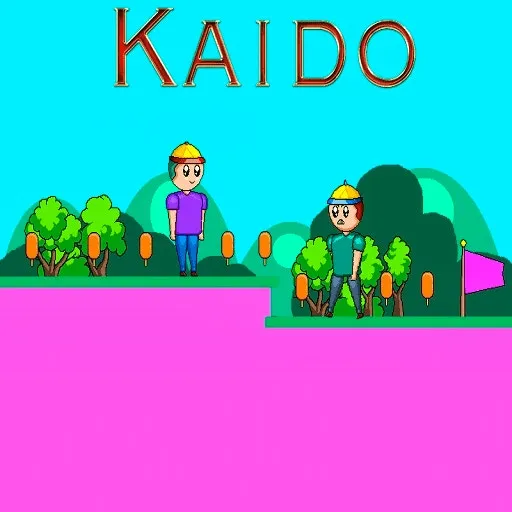
Spinning blades and hat-wearing enemies stand between Kaido's little robot and the ice cream bars it is collecting, across eight levels of flat pixel platforming. The palette is loud — hot pink ground against cyan sky — and the layouts are readable because of it, with every hazard visible well before you reach it. Double jumping is the key move, and most gaps are placed to need the second jump rather than merely allow it. Eight levels is short, which suits a game that expects a few attempts each and does not pad them out.
How to Play
- Run and jump between the platforms, using the double jump to clear the wider gaps.
- Avoid the spinning blades, which move on a fixed cycle you can wait out.
- Collect the ice cream bars scattered through each level.
- Reach the flag at the end of each of the eight levels.
Kaido FAQ
How long is Kaido?
Eight levels, each designed to take a handful of attempts rather than a long session. The difficulty is in the jump timing, so most of the runtime comes from retrying a specific gap rather than from level count.
How do you play Kaido?
Run and jump between the platforms, using the double jump to clear the wider gaps. Avoid the spinning blades, which move on a fixed cycle you can wait out. Collect the ice cream bars scattered through each level. Reach the flag at the end of each of the eight levels.
Is Kaido free to play?
Yes. Kaido is free to play in your browser on BreakArcade. There is no purchase, no subscription and no account required - open the page and press Play.
Do I need to download Kaido?
No. Kaido is an HTML5 game that runs inside your browser tab. Nothing is installed on your device, and closing the tab ends the session.
Can I play Kaido on a school Chromebook?
Kaido runs on any device with a modern browser, including low-powered school Chromebooks, because it loads in the browser rather than installing. Whether it opens depends on your network - some schools block the game host, which is outside our control.
More Runner Games







Last updated: 2026-09-19