Cooking Clash
About Cooking Clash
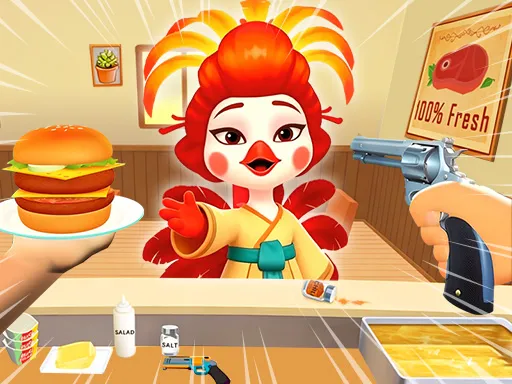
The customer is holding a revolver, which is not how most restaurant games open. You play a chicken working a counter, assembling burgers from ingredients laid out in front of you while an armed patron waits on the other side, and the game splits its controls accordingly: cooking on one hand, a weapon switch on Q and a shot on E on the other. Whether that reads as funny or simply strange depends on you, but it does mean the usual order-filling loop carries a threat the genre normally lacks.
How to Play
- Assemble each order from the ingredients on the counter.
- Press Q to switch weapons and E to shoot when it comes to that.
- Keep filling orders rather than stopping when things escalate.
- On mobile, use the on-screen buttons for the same actions.
Cooking Clash FAQ
Is this a cooking game or a shooting game?
Both, and the joke depends on the collision. The order-filling loop is standard restaurant fare, but the armed customer and the weapon controls on Q and E mean a shift can go wrong in ways a cooking game normally cannot.
How do you play Cooking Clash?
Assemble each order from the ingredients on the counter. Press Q to switch weapons and E to shoot when it comes to that. Keep filling orders rather than stopping when things escalate. On mobile, use the on-screen buttons for the same actions.
Is Cooking Clash free to play?
Yes. Cooking Clash is free to play in your browser on BreakArcade. There is no purchase, no subscription and no account required - open the page and press Play.
Do I need to download Cooking Clash?
No. Cooking Clash is an HTML5 game that runs inside your browser tab. Nothing is installed on your device, and closing the tab ends the session.
Can I play Cooking Clash on a school Chromebook?
Cooking Clash runs on any device with a modern browser, including low-powered school Chromebooks, because it loads in the browser rather than installing. Whether it opens depends on your network - some schools block the game host, which is outside our control.
More Idle & Tycoon Games


Last updated: 2026-09-19