ASTRO CHICKENS
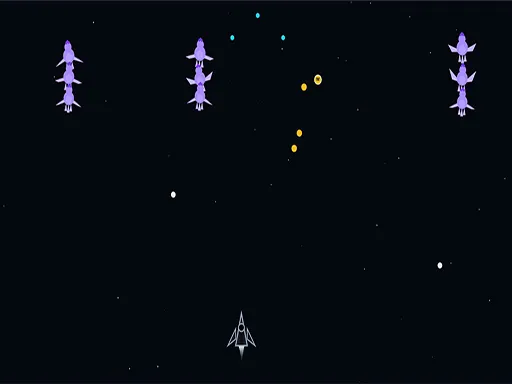
About ASTRO CHICKENS
Choosing a ship and an environment before launching gives this more front-end than a browser shooter usually bothers with, and the difficulty setting runs from Normal through Hard to Insane. The lobby means the first thirty seconds are spent picking rather than playing, which will suit some players and irritate others. Once a mission starts it is a straight arcade shooter with chickens in space, played for score. Insane is not a courtesy label; the step up from Hard is steep enough to be worth approaching gradually.
How to Play
- Open the lobby and pick an environment and a ship from the grids.
- Choose a difficulty in Settings before launching.
- Press Launch Mission and wait for the Get Ready screen.
- Start on Normal to learn the enemy patterns before moving up.
ASTRO CHICKENS FAQ
Does the ship you pick actually change anything?
Yes, the ships are selected from their own grid alongside the environment, so the loadout you take into a mission is a decision rather than decoration. Working out which one suits a given difficulty is part of why the lobby exists.
How do you play ASTRO CHICKENS?
Open the lobby and pick an environment and a ship from the grids. Choose a difficulty in Settings before launching. Press Launch Mission and wait for the Get Ready screen. Start on Normal to learn the enemy patterns before moving up.
Is ASTRO CHICKENS free to play?
Yes. ASTRO CHICKENS is free to play in your browser on BreakArcade. There is no purchase, no subscription and no account required - open the page and press Play.
Do I need to download ASTRO CHICKENS?
No. ASTRO CHICKENS is an HTML5 game that runs inside your browser tab. Nothing is installed on your device, and closing the tab ends the session.
Can I play ASTRO CHICKENS on a school Chromebook?
ASTRO CHICKENS runs on any device with a modern browser, including low-powered school Chromebooks, because it loads in the browser rather than installing. Whether it opens depends on your network - some schools block the game host, which is outside our control.
More Shooting Games

Last updated: 2026-09-19