Plane Escape Puzzle
About Plane Escape Puzzle
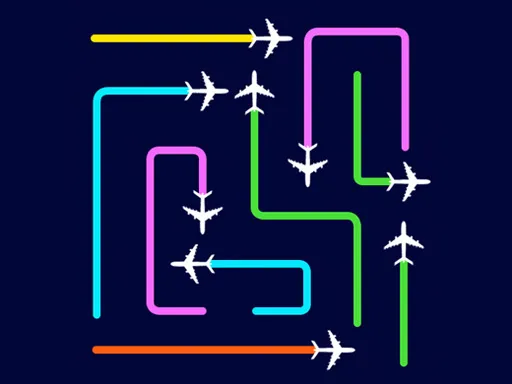
Planes sit in a tangle on a dark board, each pointing in the direction it will travel, and coloured lines show the route each one takes once released. Plane Escape Puzzle asks for the order: send the wrong aircraft first and it blocks the path another one needs, deadlocking the board. Solving a stage means reading the whole knot backwards, finding the one plane whose exit is already clear, and working from there. Later boards add more colours and tighter crossings, but the rule never changes — direction is fixed, order is yours.
How to Play
- Look at which way each plane is facing; that is the only direction it can leave the board.
- Swipe or tap a plane to send it out along its route.
- Work out the release order — a plane whose path is blocked will jam and cost you the attempt.
- Clear every aircraft from the board to finish the level.
Plane Escape Puzzle FAQ
Can you change which way a plane faces in Plane Escape Puzzle?
No. Each plane’s direction is fixed by the layout, so the entire puzzle is deciding what leaves first. Finding the one aircraft with an already-clear exit is the standard way into a stage.
How do you play Plane Escape Puzzle?
Look at which way each plane is facing; that is the only direction it can leave the board. Swipe or tap a plane to send it out along its route. Work out the release order — a plane whose path is blocked will jam and cost you the attempt. Clear every aircraft from the board to finish the level.
Is Plane Escape Puzzle free to play?
Yes. Plane Escape Puzzle is free to play in your browser on BreakArcade. There is no purchase, no subscription and no account required - open the page and press Play.
Do I need to download Plane Escape Puzzle?
No. Plane Escape Puzzle is an HTML5 game that runs inside your browser tab. Nothing is installed on your device, and closing the tab ends the session.
Can I play Plane Escape Puzzle on a school Chromebook?
Plane Escape Puzzle runs on any device with a modern browser, including low-powered school Chromebooks, because it loads in the browser rather than installing. Whether it opens depends on your network - some schools block the game host, which is outside our control.
More Puzzle Games


Last updated: 2026-09-19