City Ride
About City Ride
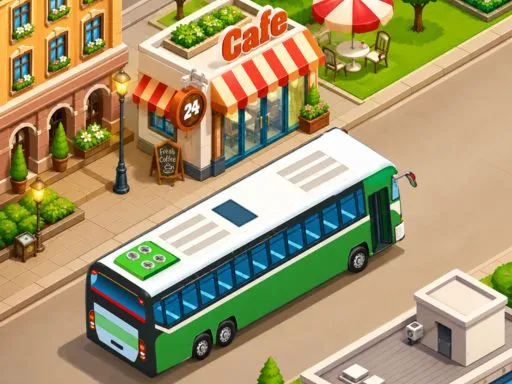
Driving a bus through an isometric city means the vehicle is longer than the turns want it to be, and that is the whole difficulty. Streets are lined with cafés, planters and parked cars that leave a narrow working width, so corners need to be taken wide and started early in a way a car never would. Clicking handles the controls. The fixed overhead angle shows the road ahead clearly but hides what is immediately behind you, which matters more when reversing than the presentation suggests.
How to Play
- Click or tap to steer the bus along the route.
- Begin turns early, since the bus is longer than the corners allow for.
- Take corners wide to keep the rear end clear of obstacles.
- Slow down before junctions rather than during them.
City Ride FAQ
Why do I keep clipping the corners?
A bus pivots much further back than a car, so the turn that looks right from the front swings the rear into whatever is on the inside. Starting the turn a vehicle length earlier than instinct suggests fixes most of it.
How do you play City Ride?
Click or tap to steer the bus along the route. Begin turns early, since the bus is longer than the corners allow for. Take corners wide to keep the rear end clear of obstacles. Slow down before junctions rather than during them.
Is City Ride free to play?
Yes. City Ride is free to play in your browser on BreakArcade. There is no purchase, no subscription and no account required - open the page and press Play.
Do I need to download City Ride?
No. City Ride is an HTML5 game that runs inside your browser tab. Nothing is installed on your device, and closing the tab ends the session.
Can I play City Ride on a school Chromebook?
City Ride runs on any device with a modern browser, including low-powered school Chromebooks, because it loads in the browser rather than installing. Whether it opens depends on your network - some schools block the game host, which is outside our control.
More Driving Games



Last updated: 2026-09-19